The best Descript alternative for podcast editing in 2026
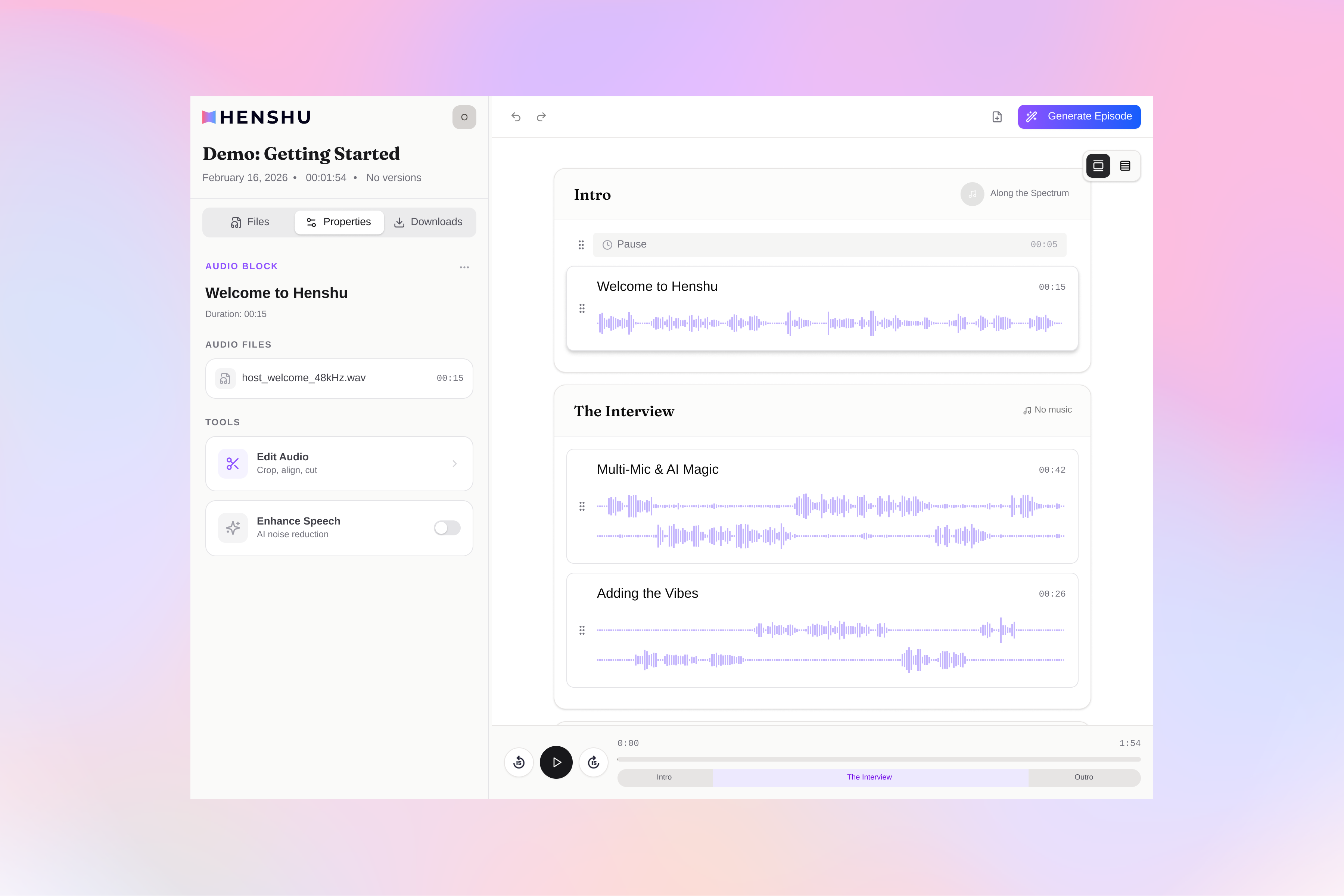
The best Descript alternative for audio-only podcast editing is a tool built for audio from the ground up. That means text-based editing, AI enhancement without credit limits, and a workflow shaped around podcast structure instead of video production. Henshu is one option that fits.
But "Descript alternative" implies something is wrong with Descript. Not quite. Descript is a capable editor with a strong feature set. The issue isn't quality, it's direction. Over the past two years, Descript grew into a video-first production platform with team collaboration, AI avatars, and enterprise features. If you're a video content team, that's exactly what you want. If you're a solo podcaster who records audio, edits audio, and publishes audio, you're navigating around a lot of features designed for someone else.
This article isn't a case against Descript. It's an honest look at what audio-only podcasters need, where Descript fits, where it doesn't, and what a purpose-built alternative looks like. We built Henshu, so we're biased. We'll try to be useful anyway.
Descript is great, but it might be more than you need
Before talking about alternatives, it's worth being clear about what Descript does well. There's quite a lot.
Descript pioneered editing audio by editing a transcript. Select words, delete them, the audio updates. For many types of edits, this is genuinely faster than scrubbing a waveform. They do it well, and they did it first.
On the video side, Descript is hard to beat. YouTube podcasts, social clips, audiograms, captioned shorts, clip generation, automatic captioning. All in one tool. No competitor matches that range for video content creators.
The collaboration features are mature too. Multiple editors on the same project, real-time commenting, version history. And Overdub (their voice cloning feature) lets you fix a mispronounced name or wrong date by generating corrected speech in your own voice. Niche feature, but when you need it, nothing else does it as cleanly.
Then there's the ecosystem. Large user community, integrations with other tools, a template library. If your collaborators already use Descript, staying in it reduces friction in ways that matter.
The fit question
Descript now has five pricing tiers, a monthly AI credit system, and an interface built around video workflows. None of that is a flaw. It's what happens when a tool grows to serve a broad user base. But for a solo podcaster publishing audio episodes, it means paying for capacity you don't use and navigating features built for a different workflow.
That's the gap this article is about. Not "Descript is bad" but "is there something built specifically for what I do?"
What audio-only podcasters actually need
If you're evaluating alternatives, here's what actually matters for audio-only podcast editing, and what you can skip.
Audio-first design
A tool built for podcasts, not for video production that also handles audio. When video is the main use case, audio features become secondary. The interface, the workflow, the defaults should all assume you're working with audio.
Text-based editing
Descript proved this works. Editing audio by editing a transcript is genuinely faster for structural changes: removing tangents, cutting filler, rearranging sections. Any serious alternative should include it.
AI enhancement without per-use limits
AI noise reduction, leveling, and EQ correction are standard now. The question is whether the tool meters your usage. A flat price with unlimited processing means you enhance every episode without rationing credits across the month.
Broadcast-standard mastering
Inconsistent loudness is one of the most common quality issues in indie podcasts. Listeners notice when your episode is quieter or louder than whatever they were listening to before. Automatic mastering to -16 LUFS (the standard for Spotify and Apple Podcasts) fixes this without requiring technical knowledge.
Simple, predictable pricing
Comparing five tiers and calculating monthly credit usage is overhead you shouldn't need. A free plan to get started, one paid plan for everything. Done.
See how Henshu works
Edit a real episode with block-based editing, AI cleanup, and automatic mastering. Every feature is on the free plan.
Try Henshu freeWhat's it like to use Henshu
Henshu is a podcast editor built for audio. Block-based editing, text-based editing, AI enhancement, automatic mastering. It launched in late 2025 and doesn't have Descript's brand recognition or ecosystem. What it has is a focused workflow for editing audio podcasts. Here's what that looks like in practice.
Block-based editing instead of a timeline
Most editors, Descript included, use a timeline: a horizontal strip where your audio stretches across the full episode. Henshu uses blocks instead. Named, stackable sections that represent the structure of your episode.
Instead of scrolling through a 45-minute waveform to find the segment you need, you see a list: Intro, Guest Interview, Topic Discussion, Outro. Rearrange your episode by dragging blocks. Edit one section by clicking into it. The rest stays out of the way.
Most podcast editing is structural. Remove a tangent, swap two topics, tighten the intro. Blocks make that feel like rearranging paragraphs in a document.
We wrote a full explainer on how block-based editing works if the concept is new.
Text-based editing with filler word removal
Like Descript, Henshu transcribes your audio and lets you edit by selecting and deleting words in the transcript. The transcript also flags filler words ("um," "uh," "you know") so you can review them in context and remove them in batches. Or leave the ones that sound natural. Your call.
The difference from Descript: filler word removal doesn't consume credits. It's part of the editing feature, available on every plan including free.
AI audio enhancement without a credit system
Henshu's AI pipeline includes noise reduction, leveling, and EQ correction. No per-use charges, no monthly credit limits. The Free plan includes standard processing. Standard ($15/month) gets priority processing. Same features either way.
If you record in imperfect environments (home office, noisy apartment, your phone), this is where you'll notice the biggest difference. We wrote an honest breakdown of what AI podcast enhancement can and can't do.
Automatic mastering to broadcast standards
Henshu masters your export to -16 LUFS automatically. That's the loudness standard for podcast platforms like Spotify and Apple Podcasts. Descript lets you adjust LUFS manually, but there's no automatic mastering step. You'd typically need a separate plugin or manual export settings.
Small feature. Big difference in how professional your podcast sounds to someone listening on their commute.
Podcast-ready music library with Seamless Loop
Henshu includes a royalty-free music library built for podcast use. What makes it different from generic music libraries is the Seamless Loop feature. If your episode runs longer than the track you picked, the music loops cleanly to cover the full length. No manual trimming, no mid-phrase fade-outs that sound weird.
Descript doesn't include a built-in music library. You'd source and import tracks from somewhere else.
AI show notes
After editing, Henshu generates show notes from your episode content: summary, topics, timestamps. Saves about 15-20 minutes of post-production per episode. In practice, this means you're more likely to actually publish show notes consistently, which helps with discoverability on podcast platforms.
Descript doesn't offer this.
What Henshu doesn't do
Being honest about gaps:
- Henshu is audio-only. No video editing at all. If video is part of your workflow, you need a different tool.
- No team collaboration or multi-user editing. Built for individual creators.
- No voice cloning. Can't generate speech to fix mistakes.
- No recording. It's an editor. You record elsewhere and bring the files in.
- No direct publishing to podcast hosts. You export and upload to Buzzsprout, Transistor, etc. separately.
- Henshu launched in late 2025. Small user community, no template library, limited integrations. We don't have the ecosystem Descript has built over years. Not yet, anyway.
Hear the difference yourself
Upload your audio and let Henshu handle noise, levels, and mastering. Free to start, no credit card required.
Try Henshu freeHonest comparison
| Feature | Henshu | Descript |
|---|---|---|
| Text-based editing | ||
| Filler word removal | Unlimited | Uses AI credits |
| AI audio enhancement | Unlimited | Uses AI credits |
| Automatic mastering (-16 LUFS) | ||
| Block-based editing | ||
| Music library with Seamless Loop | ||
| AI show notes | ||
| Video editing | ||
| Voice cloning (Overdub) | ||
| Team collaboration | Creator plan+ | |
| Recording |
Pricing in practice
Henshu has two plans: Free and Standard ($15/month, or $150/year). Both include every editing feature. The difference is storage limits, transcription minutes, and processing speed.
Descript has five plans: Free, Hobbyist ($24/mo or $16/mo billed annually), Creator ($35/mo or $24/mo annual), Business ($65/mo or $50/mo annual), and Enterprise (custom). Features are tiered. AI features consume monthly credits.
For a solo podcaster publishing weekly, Henshu Standard at $15/month covers everything with no usage caps. The closest Descript equivalent, Hobbyist at $16-24/month, includes 10 hours of media and 400 AI credits. Whether that's enough depends on your episode length and how heavily you use AI processing. Podcasters editing four hour-long episodes monthly will likely bump into those limits.
Try it on a real episode
Henshu's free plan has no feature limits. Import your audio, edit, enhance, and export. Decide from there.
Try Henshu freeWhich tool fits your workflow
The right tool depends on what you're making and how you work.
Descript is the better fit if:
- Video content is part of your podcast workflow (YouTube, social clips, audiograms)
- You work with a team that needs real-time collaboration
- You need voice cloning for corrections
- You want a large ecosystem of integrations, templates, and community
- You're already productive in Descript and the complexity doesn't slow you down
Henshu might be a better fit if:
- You edit audio-only podcasts (solo shows, interviews, panels)
- You want a simpler interface without video features you don't use
- You'd rather not manage AI credits and usage meters
- You're new to podcast editing and found other tools overwhelming
- You want broadcast-standard mastering without an extra tool
- You record in imperfect environments and need AI cleanup on every file
- You want background music that automatically adapts to your edits
Not sure? Try a real episode.
Henshu's free plan includes every editing feature: block-based editing, text-based editing, AI enhancement, mastering, music library, show notes, filler word removal. Storage and transcription are both limited to 5 hours, but that's enough to edit a real episode and feel whether the approach clicks.
Import something you've already recorded. Run it through the editor. Hear the enhancement. Decide from there. Better than reading comparison articles. Including this one.
Ready to try Henshu?
The free plan includes every editing feature. 5 hours of storage and transcription. No credit card.
Try Henshu freeFrequently asked questions
Henshu is a focused podcast editor for audio-first creators. Simpler by design, with AI enhancement and mastering on every plan. It's new, still growing, and it won't be right for everyone. The free plan includes every feature, so the fastest way to decide is to try it on a real episode.
Hear the difference yourself
Upload your audio and let Henshu handle noise, levels, and mastering. Free to start, no credit card required.
Try Henshu free